A Campus Livre project · MIT licence

MatLivre

An open, free and faster alternative.

A free, open-source alternative to MATLAB and GNU Octave: a fast live script editor and runtime for MATLAB code. Open, edit and run .mlx live scripts and plain .m files with results, tables and figures inline, in a native Windows app. The language engine is an independent clean-room implementation written in Rust: no MATLAB installation, no licence, no Java.

Free does not mean slower. On our benchmarks MatLivre matches or beats MATLAB R2023b: faster in 11 of 12 language tests, within 1.2× in the other, and about 43× faster on live scripts.

Open source, MIT licence. The code is on GitHub for anyone to read, use and improve. Issues and pull requests are welcome.

Windows 10 and 11 (installer or portable ZIP) and Linux (AppImage). Free, no account. Windows is the main platform. Windows warning? Installing on Linux

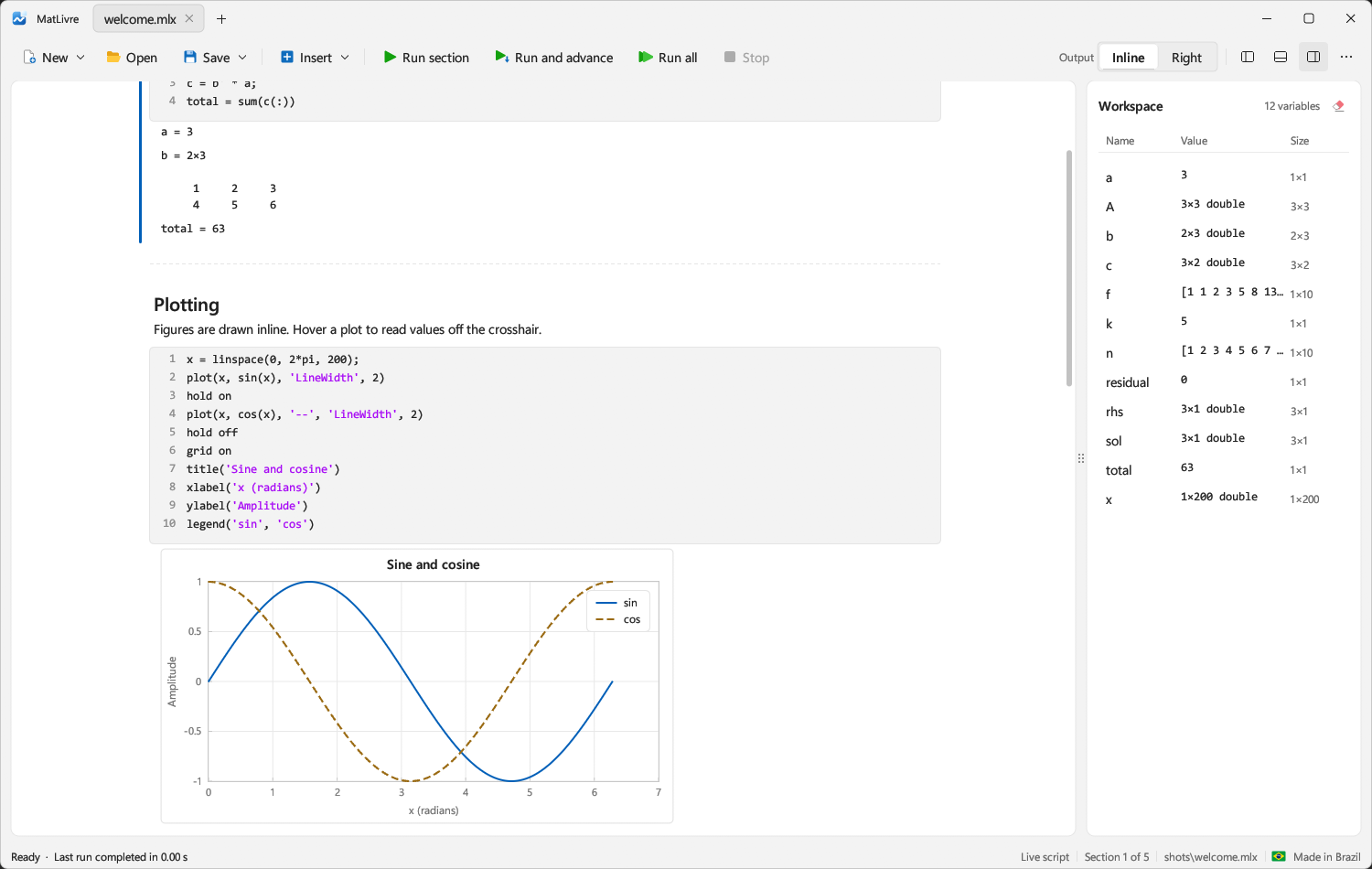
The MatLivre window: a live script with code and printed results, an inline sine and cosine plot, and the workspace panel listing twelve variables.
0.3 sfor the app to open and be ready (1 s on the first launch)
43×faster than MATLAB's Live Editor on a typical four-figure notebook
5.5×faster than MATLAB R2023b on language benchmarks (geometric mean), 83× faster than Octave and 83× than Scilab
1,837MATLAB and Symbolic Math Toolbox functions implemented
36 MBone executable, depending only on DLLs shipped with Windows
Why MatLivre exists

Decades of scientific code should not depend on a licence server.

A huge amount of teaching material, thesis code and lab tooling is written in MATLAB's language. Running it normally means a paid licence, tied to a vendor in another country that can reprice, restrict or withdraw access.

MatLivre lets that work keep running: on a student's laptop, in a school with no budget, in a lab that has just lost its seats. It reads the same files, produces the same displayed output and costs nothing.

Performance

Equal or better than the commercial alternative.

Measured on one machine (Intel Core i5-10600K, 24 GB RAM, Windows 11 Pro) against MATLAB R2023b, GNU Octave 11.3.0 and Scilab 2025.0.0, run one after another, never at the same time.

Running a live script

Engine First run Warm run
MatLivre0.14 s0.11 s
MATLAB Live Editor14.30 s4.91 s
MATLAB, same code as a plain .m1.17 s0.37 s
GNU Octavecannot run live scripts

A notebook with eight sections (matrix algebra, a loop, statistics, a table, string processing) and four figures. MatLivre does not yet write outputs back into the file. The benchmark script is in the repository.

Running code (all 12 cases, milliseconds, lower is better; green is fastest)

Case MATLABOctaveScilabMatLivre vs MATLAB vs Octave vs Scilab
scalar_loop (2M iterations)4.572,267.821,662.672.691.7×844×619×
while_branch (Collatz, 2.9M steps)79.6211,231.6970,510.3814.305.6×785×4,929×
fib_recursive (fib 20)0.96123.4270.680.0615.8×2,023×1,159×
array_growth (100k appends)6.83377.48211.681.185.8×319×179×
indexed_assign (1M writes)2.931,996.90879.512.361.2×847×373×
vector_math (2M elements)107.4092.81180.5910.6510.1×8.7×17.0×
matmul_3000.680.550.190.332.1×1.7×1.8× slower
linsolve_3000.531.540.480.591.1× slower2.6×1.2× slower
sort_1e659.0914.82185.386.978.5×2.1×26.6×
string_build (20k appends)207.04249.86491.8035.305.9×7.1×13.9×
struct_fields (500k updates)144.114,309.091,841.380.65223×6,660×2,846×
cell_ops (100k writes + reads)21.54561.40349.366.703.2×83.8×52.1×

Across all 12 cases the geometric mean is 5.5× faster than MATLAB, 83× faster than Octave and 83× faster than Scilab, with identical checksums in all four. MatLivre is faster than MATLAB in 11 of 12 cases (slower in linsolve_300), faster than Octave in all 12 and faster than Scilab in 10 (slower in matmul_300 and linsolve_300). Scilab runs a port of the script in its own syntax. Cases under 1 ms vary by tens of percent between runs, and the suite is small and favours native loop compilation. Measured on 2026-11-07. The ratio columns are computed from the table. Full results are in benchmarks/RESULTS.md.

Starting up

ProgramFirst launchWarm launch
MatLivre app (window ready)0.97 s0.31 s
MatLivre CLI0.03 s0.07 s
GNU Octave CLI2.56 s0.35 s
MATLAB desktopn/a3.90 s
MATLAB -batch24.30 s6.84 s

Time until the program has run a line of code, or until you can work in it. MATLAB’s first launch was a true cold start. The Octave GUI is not shown: its first start stops at a setup wizard.

Side by side, and vs Octave

MatLivre, MATLAB, Octave and Scilab.

GNU Octave is a long-standing free alternative and MATLAB is the reference. Each has strengths, so here is an honest comparison.

MatLivreMATLABOctaveScilab
PriceFreePaid licenceFreeFree
LicenceMITProprietaryGPLCeCILL v2.1
Source codeOpenClosedOpenOpen
Needs a licence server or a MATLAB installNoYesNoNo
Live scripts (.mlx) with inline resultsYesYesNoNo
Runs .m scriptsYesYesYesNo (own language, with a converter)
Speed on language benchmarksFastest in 10 of 12 casesReferenceSlower than MatLivre in all 12Slower than MatLivre in 10 of 12
Startup (warm)0.31 s3.90 s0.35 s–
Compatibility with MATLABTargets R2023b semantics, display and errorsReferenceLargely compatible, with known differencesSimilar syntax, not a drop-in replacement
Toolboxes and SimulinkSymbolic Math onlyExtensivePackages from Octave ForgeXcos and ATOMS modules
PlatformsWindows, Linux (AppImage)Windows, macOS, LinuxWindows, macOS, LinuxWindows, macOS, Linux

Choose MATLAB if you need Simulink or toolboxes MatLivre does not cover. Choose Octave if you need macOS, or the most mature Linux option. Choose MatLivre if you want a free, open, fast live-script environment on Windows or Linux for the MATLAB code you already have. Scilab is also free and open source (CeCILL licence, maintained by Dassault Systèmes) and is a good choice for Xcos and its own ecosystem, but it uses its own language, not MATLAB’s. Octave and Scilab details are from public documentation and the benchmarks above; check each project for the latest.

Why choose MatLivre over Octave.

Octave is a respected free alternative to MATLAB and we owe it a lot. If you want one that also runs live scripts, is faster and looks like a modern notebook, this is where MatLivre is better:

Octave cannot open live scripts. MatLivre can.

Octave has no support for .mlx files and no live editor with inline output. MatLivre opens, edits and runs them, with results, tables and figures next to the code. It also keeps your .m files working.

Faster, in every benchmark we ran.

MatLivre was faster than Octave in all 12 language benchmarks, 83× faster on the geometric mean, with identical results. Loops, recursion, array growth and struct updates are compiled to machine code instead of interpreted.

A notebook, not a command window.

In Octave, %% sections print to the command window and figures open in separate windows. In MatLivre, each section runs on its own, with live controls (sliders, drop-downs, check boxes), a workspace browser and figures inline.

Ready in a blink, even the first time.

The app is ready in 0.97 s on a first launch (0.31 s after). Octave’s command line takes 2.56 s on a first launch, and its GUI stopped at a setup wizard when we first started it.

Built to match MATLAB’s output.

Display format, error messages and semantics are checked against MATLAB R2023b, for 1,837 functions including the Symbolic Math Toolbox, classdef and table. The goal is that code written for MATLAB gives the same output, not just similar output.

Where Octave is still the better choice: it runs on macOS too, it has decades of maturity, and it has a large package ecosystem (Octave Forge). MatLivre is young: Windows is its main platform, Linux is newer and less tested, and there is no macOS build yet. Benchmarks and methods are in the repository.

The app

A notebook that feels like a native tool.

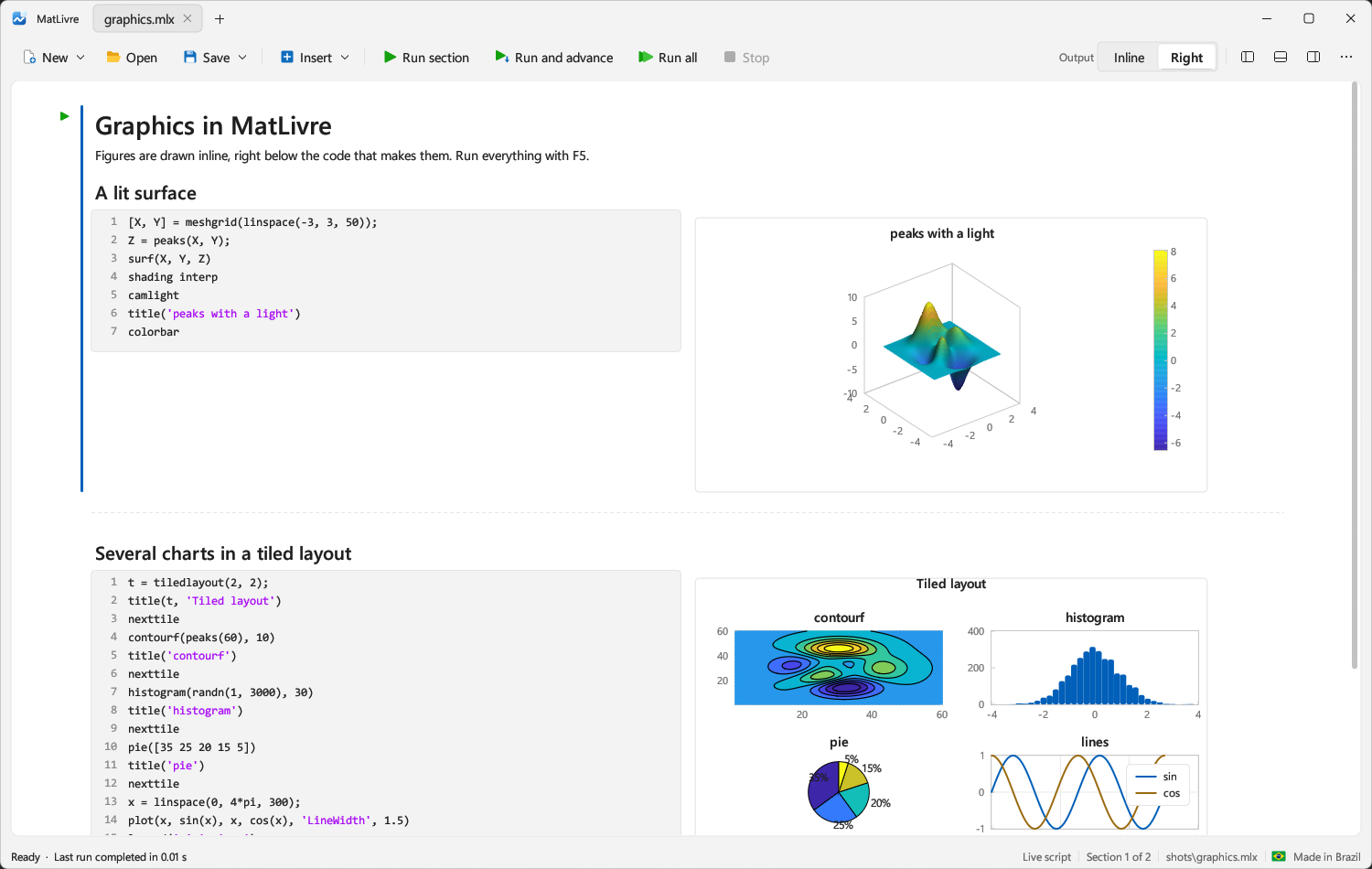
MatLivre showing several figures drawn inline next to the code that produces them.
Figures are drawn next to the code that makes them, with a crosshair that reads values off the plot.
  • Live scripts. Formatted text, code and results inline or on the right. Run a section, run and advance, or run all, and stop between statements.
  • Live controls. Sliders, drop-downs, check boxes and edit fields in .mlx files.
  • Plots. 2-D and 3-D, surfaces with lighting, contours, images, heatmaps, box and bubble charts, two y axes, tiled layouts. Export to PNG and SVG.
  • Workspace. Files panel, workspace browser, command window, draggable tabs, light and dark themes.
  • Never frozen. Code runs on its own thread; files changed by another program reload, and unsaved edits are never overwritten.

An optional AI assistant, on your terms

If you already have Claude Code installed, MatLivre can add a chat panel, code completions and an MCP server that work through it. This is optional: the editor and the language engine never need it, there is no API key, and it can be switched off from the app's menu.

The language

MATLAB compatibility is the rule.

Semantics, display format and error messages follow MATLAB R2023b, and the test suite compares MatLivre's output with MATLAB's for each function family.

Core language

N-D arrays of every numeric type, strings, complex numbers, cell and struct arrays, classdef with inheritance, events and enumerations, table, timetable, datetime, containers.Map.

Mathematics

Linear algebra, ODE and PDE solvers, optimisation, statistics, FFT and filtering, sparse matrices and iterative solvers, graphs and networks, computational geometry.

Symbolic Math

Exact arithmetic, diff, int, limit, taylor, solve, Laplace transforms, simplify, special functions, orthogonal polynomials, and symbolic units.

Browse and search every function MatLivre covers, each with its own page. The status of every function of the MATLAB and Symbolic Math Toolbox references is in the coverage checklist.

Clean-room

Built from behaviour, not from source.

MatLivre was written from observed behaviour only. The live script format is documented in a public specification produced by inspecting .mlx data files and the public behaviour of the Live Editor. Language behaviour is checked by running code and comparing outputs. No MathWorks source code was read or copied.

MATLAB is a registered trademark of The MathWorks, Inc. MatLivre is an independent project and is not affiliated with or endorsed by The MathWorks.

Honest limits

What it does not do yet.

MatLivre is young (version 0.1.x). It will not run every MATLAB program yet, and we would rather say so than let you find out at a deadline.

  • Windows is the main platform. Linux (AppImage) was tested on Ubuntu 24.04 only, and there is no macOS build yet.
  • Saved outputs in .mlx files are not restored on open or written back; run the script to regenerate them.
  • Rich text in live scripts (bold, italics, links, equations, images) is shown as plain text.
  • Some functions are missing, including dsolve and symbolic code generation. Toolboxes beyond Symbolic Math are not covered.
  • Some random-number streams, chart layouts and dithering details differ from MATLAB's.

The complete, current list is under Known limits in the README.

Contribute

Help us make it faster and more compatible.

MatLivre is open source and built in public. You do not have to be an expert in Rust or numerical computing to help: a good bug report is a contribution. Issues and pull requests are welcome, and every fix makes free scientific software better for everyone.

Make it faster

Performance is a feature. Profile the benchmarks, find a slow path, and speed it up: native code generation, multithreaded linear algebra, avoiding copies. The cases where others still win (linsolve_300 against MATLAB and Scilab, matmul_300 against Scilab) are a good place to start.

Benchmarks →

Close compatibility gaps

Pick a function from the coverage checklist that is not implemented yet, add it, and test it against recorded MATLAB R2023b output. Fixing a difference in display format or an error message counts too.

Coverage checklist →

Break it with real code

Run the scripts and live scripts from your course, thesis or lab. When something fails, differs from MATLAB or runs slowly, open an issue with the smallest example you can. This is the most valuable contribution there is.

Open an issue →

Bring it to more platforms

Windows is the main platform. Testing on more Linux distributions, and a macOS port, would open MatLivre to many more students and labs.

Discuss a port →

Improve the app and the docs

Live scripts with rich text, equations and saved outputs, better plots, accessibility, translations, examples and tutorials: there is plenty to build in the app and around it.

Known limits →

Ready to start?

Fork the repository, make your change, and open a pull request. Maintainers will review it in the open.

Two rules that keep the project safe

  • Clean-room only. Learn MATLAB’s behaviour from its documentation and from running code. Never read or copy MathWorks source code, including the .m files in a MATLAB installation.
  • Compatibility needs evidence. New functions come with tests whose expected output was recorded from MATLAB R2023b. See the contributor notes for the workflow.
Get it

Download, or build it yourself.

Grab the Windows installer or portable ZIP, or the Linux AppImage, from the latest release. Or build from source with a recent Rust toolchain; on Windows the result runs on any Windows 10 or 11 machine with nothing else installed.

git clone https://github.com/campuslivre/matlivre
cd matlivre
cargo run -p livre-app --release

# run a script headless
matlivre-cli script.m

Installing on Linux

Linux gets a single AppImage: one file that runs without installing anything system-wide and without root. It was tested on Ubuntu 24.04 (GNOME, Wayland); other distributions may work but are not tested yet. If something fails, please tell us which distribution you use.

1. From the terminal

mkdir -p ~/.local/bin
curl -L -o ~/.local/bin/matlivre https://github.com/campuslivre/matlivre/releases/latest/download/matlivre.AppImage
chmod +x ~/.local/bin/matlivre
matlivre

This keeps the file in ~/.local/bin, which most distributions already have on the PATH (log out and in once if matlivre is not found). Running the same curl line again later replaces it with the newest version.

2. From the file manager

  1. Download matlivre.AppImage with the Install button above.
  2. Right-click the file, open Properties, and in Permissions allow executing the file as a program.
  3. Double-click it.

If it does not start and the message mentions FUSE, install your distribution's libfuse2 package (libfuse2t64 on recent Ubuntu), or run matlivre --appimage-extract-and-run. Menu names vary between desktops. Prefer to build it yourself? Use the commands above; the build needs build-essential pkg-config libgtk-3-dev libxkbcommon-dev libwayland-dev on Ubuntu or Debian.

Windows says “Windows protected your PC”? That is expected.

MatLivre is a young, independent project and the installer is not code-signed yet. Code-signing certificates cost money every year, and Microsoft SmartScreen warns about any program that is unsigned or not yet widely downloaded. The warning is about reputation, not about a problem found in the file. You can read every line of the source code, or build it yourself.

1. Windows SmartScreen

  1. Open the downloaded installer.
  2. On the blue “Windows protected your PC” window, click More info.
  3. Click Run anyway.

2. Browser download warning

  1. Edge: in the downloads list, open the … menu next to the file, choose Keep, then Show more and Keep anyway.
  2. Chrome: open the downloads list and click Keep next to the file (or the arrow, then Keep anyway).
  3. Firefox: in the downloads panel, choose Allow download if it asks.

Menu names vary a little between Windows and browser versions and languages. Only run files you downloaded from this site or from the project’s GitHub releases page. Prefer not to trust a binary? Build from source with the commands above.

About the initiative

Campus Livre

MatLivre is the first project of Campus Livre, an initiative that builds free, open-source software for academic and scientific work, made in Brazil. We believe that knowledge software should not sit behind paywalls, because that slows down the progress of knowledge and technology, and that no country should depend on a commercial product that a foreign vendor or government can cut off.

Our projects are free, run on your own machine, read and write the formats you already have, are built without copying anyone's code, and are honest about what they cannot do yet.